Friday, December 16, 2016
Fuzzy de-duplication via a formula field in Salesforce
The following example will show you how to setup a fuzzy duplicates detection list-view with a mass-merge option..


Tuesday, August 23, 2016
Set a new field value in bulk by using a custom formula on a subset of your records / all records (without coding)
The following example will show you how to set a new field value in mass by using a custom formula on a subset of your records / all your records (across all the list-pages). The following process can work on any object & field - we built the following example for a custom "SLA" field located under the standard Account object.
2. Create an update-action-process using Salesforce's process builder and add the desired formula to populate your field (setup>create>Workflow & Approvals>Process Builder> use the update record action):

3. Go to smart-mass-update>accounts tab & click on the mass update button:
Before the update:
Choose the same field you chose in step#2 & mass update all the rows (grid filters will be respected):

The result:

5. Disable the process/flow - in case you don't need that for all the rows.
Mass update in action:
Creating a custom formula & using it in Mass:
1. Optional Step: Backup your data via Setup>Data Management>Data Export (you will be able to revert / compare)2. Create an update-action-process using Salesforce's process builder and add the desired formula to populate your field (setup>create>Workflow & Approvals>Process Builder> use the update record action):

3. Go to smart-mass-update>accounts tab & click on the mass update button:
Before the update:

Choose the same field you chose in step#2 & mass update all the rows (grid filters will be respected):

The result:

5. Disable the process/flow - in case you don't need that for all the rows.
Mass update in action:
Wednesday, August 17, 2016
Deduplicate your records by using a custom data-formula
The following example will show how to dedupe your data by using a custom formula (10 chars from the name + 5 chars from the phone number). In case you only need to you add a second field to the de-duplication report/process then just change the grouping statement (e.g. "group by name, phone" under custom settings).
2. Build the formula to populate your field via process builder (setup>create>Workflow & Approvals>Process Builder> use the update record action):
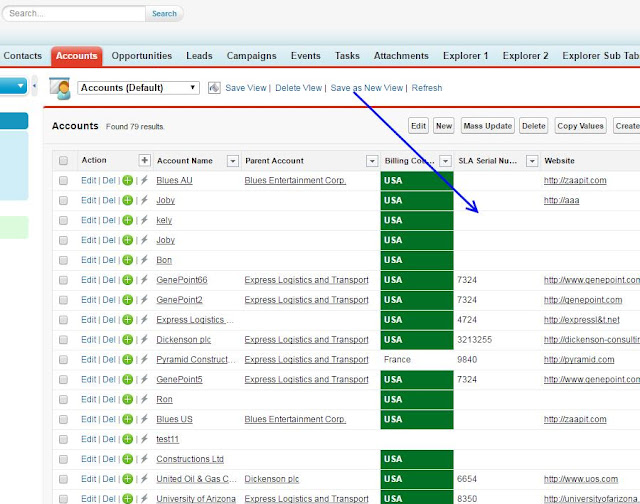
3. Go to smart-mass-update>accounts tab & mass update the "SLA Serial number" field:
Before the update:
Choose the field & mass updating all the rows (filters will be respected):
The mass update result:
4. Create a custom dedup tab - follow the below video and use your new custom field (instead of website):
https://www.youtube.com/watch?v=bQ-ee2jO0w4
5. Once you verified that the formula separates your data to "right" duplicates row-sets then you can start to mass-merge those duplicates groups (mass merging starts at 00:23):
Creating a custom formula to de-duplicate your data:
1. Create a custom text field (250 chars) for the relevant object via via setup>"object name">fields>create custom field .... in the following example I will use the account object and I will create a custom field named "SLA Serial number".2. Build the formula to populate your field via process builder (setup>create>Workflow & Approvals>Process Builder> use the update record action):
3. Go to smart-mass-update>accounts tab & mass update the "SLA Serial number" field:
Before the update:
Choose the field & mass updating all the rows (filters will be respected):
The mass update result:
4. Create a custom dedup tab - follow the below video and use your new custom field (instead of website):
https://www.youtube.com/watch?v=bQ-ee2jO0w4
5. Once you verified that the formula separates your data to "right" duplicates row-sets then you can start to mass-merge those duplicates groups (mass merging starts at 00:23):
Sunday, August 7, 2016
Update / Edit / Delete data in Salesforce.com in bulk
If you are looking for an app that can perform mass actions on any data stored in Salesforce.com then you reached the right place.
 by Rene Ford

Smart-Mass-Update™ for Salesforce.com
by Rene Ford
Main features:
- Bulk Update
- Bulk Delete
- Mass Create sub-records
- Mass Add in place
- Mass Clone
- Mass Convert
- Mass Inline Edit (excel style)
- Mass Email via Salesforce's Template & outlook.
- Conditional Styling (color and field / color based on formula / condition)
- 100% Native app
Tuesday, August 2, 2016
Stop duplicate contacts accounts and leads from entering into your Salesforce - How to Guide
by Rene Ford
- Create Duplicate Matching Rules: Setup > Data.com Administration > Duplicate Management > Matching Rules
- Create Duplicate Detection Rules: Setup > Data.com Administration > Duplicate Management > Duplicate Rules.
- To clean all the existing duplicates use dedup-manager.
Dedup-Manager in Action:
Dedupe dashboard / charts:

Dedupe sub tabs (eliminate existing duplicates):

Thursday, June 2, 2016
Conditional Styling & formatting for grids in Salesforce's
Add custom colors, images & style to your Salesforce's grids with ease with Smart-Mass-Update / Smart-Tables for Salesforce. Just follow the steps in the video and add your custom conditional design to your grids.
by Rene Ford

by Rene Ford
Conditional Styling in Action:
The following video color new lead rows in green and add the rule as legend.
Wednesday, May 18, 2016
Update / Delete data in Database.com in bulk
If you are looking for an app that can perform mass actions on data stored in database.com then you reached the right place.
by Rene Ford
Smart-Mass-Update™ for Database.com
by Rene Ford
Main features:
- Bulk Update
- Bulk Delete
- Mass Create sub-records
- Mass Add in place
- Mass Clone
- Mass Inline Edit (excel style)
- 100% Native app
Subscribe to:
Posts (Atom)